Your Identity Is the New SSH Key: Introducing Twingate Privileged Access for SSH

TL;DR: Twingate Privileged Access for SSH lets your team SSH into any server using their existing identity provider credentials, with no SSH keys, no bastion hosts, and a full session recording tied to each user. It's available now in early access, free for up to 5 SSH Resources.
The SSH Problem Nobody Enjoys Solving
SSH is the most common protocol for server access, and managing it at scale is one of those problems that quietly gets worse until something breaks.
Every developer has key pairs on their laptop. Those keys are long-lived, get copied to personal machines, and never get fully cleaned up when someone leaves.
Admins maintain authorized_keys files across dozens or hundreds of servers, with no reliable way to know which keys are still in use. It's a problem that scales linearly with headcount and exponentially with server count.
Bastion hosts are the typical workaround. They solve the "no public IP" requirement, but they introduce their own pain: a shared public endpoint that's a high-value target, double-hop connections that frustrate developers, and no per-session audit trail.
When a compliance auditor asks "what did that contractor do on the production server last Tuesday," a bastion host gives you a connection log and a shrug.
SSH Access Through Your Identity Provider
Twingate Privileged Access for SSH takes a different approach. Instead of distributing keys or routing through shared bastions, it authenticates SSH sessions through your existing identity provider and issues short-lived certificates on the fly.
Here's what that looks like in practice: a developer runs ssh my-server.int. The Twingate Client routes the connection to a Gateway, a Layer 7 reverse proxy deployed in your environment.
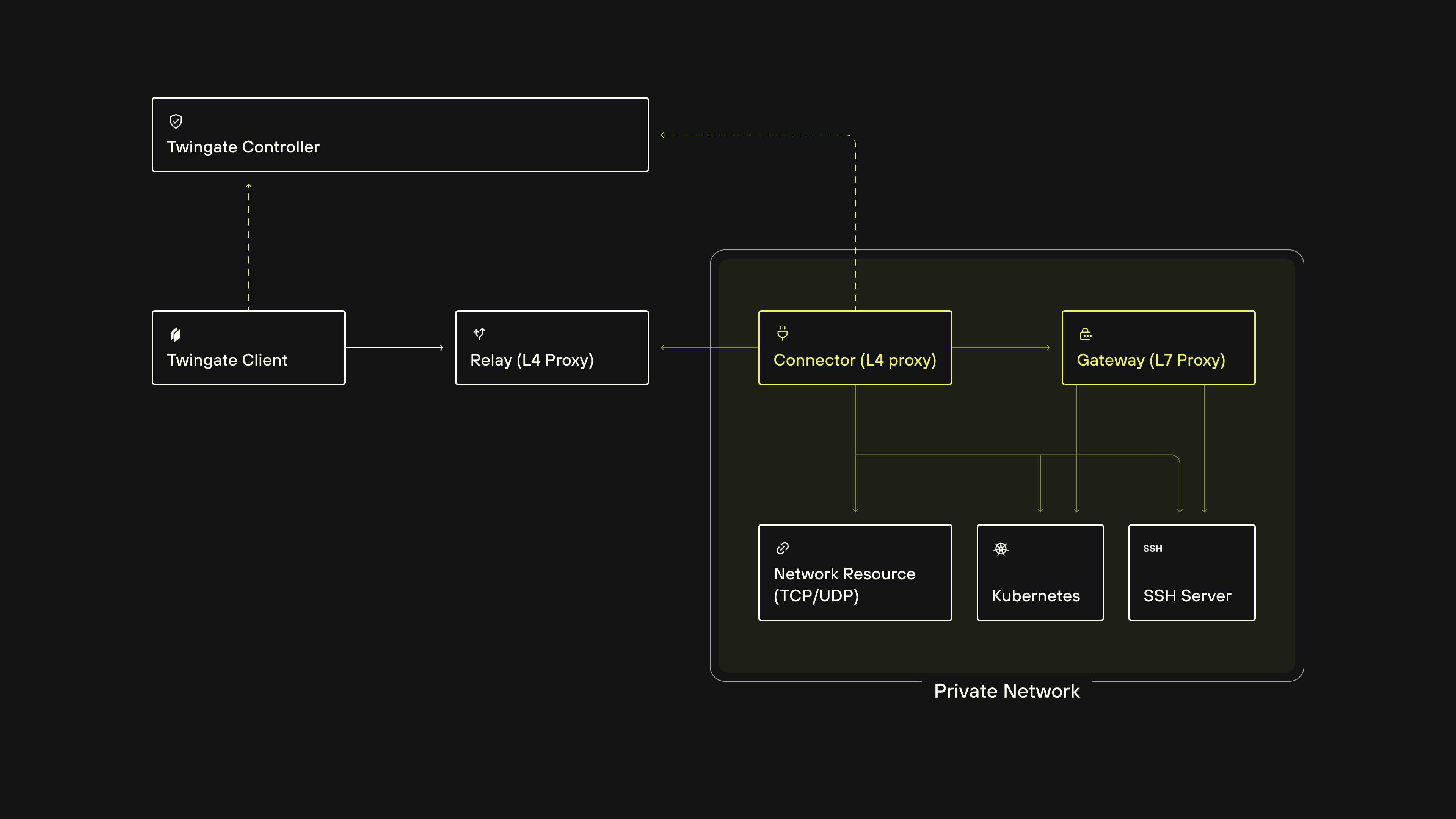
The Gateway verifies the user's identity against your IdP (including Okta, Entra ID, and Google Workspace), fetches a short-lived SSH certificate from the SSH CA, and authenticates to the target server. The user never touches a key.
What You Can Do With Privileged Access for SSH
Replace bastion hosts entirely
SSH servers stay in a private network with no public IPs. The Twingate Connector makes outbound-only connections, and the Twingate Gateway proxies authenticated sessions directly to the target VM. Users connect in a single hop to any server they're authorized for, regardless of cloud or on-prem location.
Eliminate SSH key management
No more distributing public keys, maintaining authorized_keys files, or rotating credentials when someone leaves. Users authenticate via SSO. Revoking access is a single Group change in the Admin Console, not a key cleanup across every server.
Record every session, tied to a real identity
Every SSH session is captured in asciicast v2 format and stored entirely on your infrastructure. Recordings never touch Twingate's servers. Forward them to Splunk, Datadog, or any SIEM, and then replay them in a browser.
Use native ssh end to end
Developers use the standard ssh binary, not a wrapper or custom CLI. That means VS Code Remote SSH, JetBrains Gateway, Ansible, Terraform remote-exec, sftp, rsync, and CI/CD pipeline SSH steps all work without modification. Tools that replace ssh with a proprietary binary break these integrations. Twingate doesn't.
Where Privileged Access for SSH Fits
A few specific scenarios where this changes how teams work:
Remote development
The Twingate Client automatically syncs ~/.ssh/known_hosts with the CA's public keys, so host verification is handled without any manual steps. Developers still add remote hosts to VS Code or JetBrains Gateway the same way they normally would — Twingate just removes the friction of managing known hosts as your team's resource list changes.
CI/CD pipelines
Pipelines that SSH into deployment targets typically store long-lived SSH private keys as pipeline secrets. With Twingate, the deployment target is a private SSH Resource with no public port. The CI/CD runner uses a headless Twingate Client to join the network, and the Gateway handles certificate-based authentication. No SSH private key ever needs to exist in the pipeline's secret store.
Contractor and vendor access
Add contractors to a Group with access to only the specific servers they need. Time-bound policies automatically revoke access after a set period. The Gateway issues certificates on the fly, so the contractor never holds a persistent credential, and every action is recorded.
Compliance
SOC 2, ISO 27001, PCI-DSS, and HIPAA all require evidence of who accessed sensitive systems and what they did. Session recordings tied to real user identities, stored on your own infrastructure, cover that requirement without a separate session recording product.
One Policy Engine for Everything
If you're already using Twingate for network access or privileged Kubernetes access, SSH works the same way. The same device posture checks, MFA requirements, geoblocking, and time-based access policies that apply to your other Resources apply to SSH Resources automatically. There's no separate policy model to configure. It's the same Gateway architecture, the same Admin Console, the same Groups.
Deployment and Availability
The Gateway deploys via Terraform for VM-based environments. It supports hybrid, multi-cloud, and on-prem infrastructure, and works with any standards-compliant SSH server (including OpenSSH sshd on Linux, macOS, and Windows Server).
Privileged Access for SSH is available now, free for up to 5 SSH Resources. If you're already running Twingate Connectors, you can add SSH access to your existing environment.
Get Started
Check out our Quick Start Guide and the SSH Privileged Access documentation for step-by-step setup instructions, session recording configuration, and Gateway deployment options.
New to Twingate? You can use Twingate for free for up to 5 users, request a personalized demo, or reach out to the team over on the Twingate subreddit.
Rapidly implement a modern Zero Trust network that is more secure and maintainable than VPNs.
Your Identity Is the New SSH Key: Introducing Twingate Privileged Access for SSH
TL;DR: Twingate Privileged Access for SSH lets your team SSH into any server using their existing identity provider credentials, with no SSH keys, no bastion hosts, and a full session recording tied to each user. It's available now in early access, free for up to 5 SSH Resources.
The SSH Problem Nobody Enjoys Solving
SSH is the most common protocol for server access, and managing it at scale is one of those problems that quietly gets worse until something breaks.
Every developer has key pairs on their laptop. Those keys are long-lived, get copied to personal machines, and never get fully cleaned up when someone leaves.
Admins maintain authorized_keys files across dozens or hundreds of servers, with no reliable way to know which keys are still in use. It's a problem that scales linearly with headcount and exponentially with server count.
Bastion hosts are the typical workaround. They solve the "no public IP" requirement, but they introduce their own pain: a shared public endpoint that's a high-value target, double-hop connections that frustrate developers, and no per-session audit trail.
When a compliance auditor asks "what did that contractor do on the production server last Tuesday," a bastion host gives you a connection log and a shrug.
SSH Access Through Your Identity Provider
Twingate Privileged Access for SSH takes a different approach. Instead of distributing keys or routing through shared bastions, it authenticates SSH sessions through your existing identity provider and issues short-lived certificates on the fly.
Here's what that looks like in practice: a developer runs ssh my-server.int. The Twingate Client routes the connection to a Gateway, a Layer 7 reverse proxy deployed in your environment.
The Gateway verifies the user's identity against your IdP (including Okta, Entra ID, and Google Workspace), fetches a short-lived SSH certificate from the SSH CA, and authenticates to the target server. The user never touches a key.
What You Can Do With Privileged Access for SSH
Replace bastion hosts entirely
SSH servers stay in a private network with no public IPs. The Twingate Connector makes outbound-only connections, and the Twingate Gateway proxies authenticated sessions directly to the target VM. Users connect in a single hop to any server they're authorized for, regardless of cloud or on-prem location.
Eliminate SSH key management
No more distributing public keys, maintaining authorized_keys files, or rotating credentials when someone leaves. Users authenticate via SSO. Revoking access is a single Group change in the Admin Console, not a key cleanup across every server.
Record every session, tied to a real identity
Every SSH session is captured in asciicast v2 format and stored entirely on your infrastructure. Recordings never touch Twingate's servers. Forward them to Splunk, Datadog, or any SIEM, and then replay them in a browser.
Use native ssh end to end
Developers use the standard ssh binary, not a wrapper or custom CLI. That means VS Code Remote SSH, JetBrains Gateway, Ansible, Terraform remote-exec, sftp, rsync, and CI/CD pipeline SSH steps all work without modification. Tools that replace ssh with a proprietary binary break these integrations. Twingate doesn't.
Where Privileged Access for SSH Fits
A few specific scenarios where this changes how teams work:
Remote development
The Twingate Client automatically syncs ~/.ssh/known_hosts with the CA's public keys, so host verification is handled without any manual steps. Developers still add remote hosts to VS Code or JetBrains Gateway the same way they normally would — Twingate just removes the friction of managing known hosts as your team's resource list changes.
CI/CD pipelines
Pipelines that SSH into deployment targets typically store long-lived SSH private keys as pipeline secrets. With Twingate, the deployment target is a private SSH Resource with no public port. The CI/CD runner uses a headless Twingate Client to join the network, and the Gateway handles certificate-based authentication. No SSH private key ever needs to exist in the pipeline's secret store.
Contractor and vendor access
Add contractors to a Group with access to only the specific servers they need. Time-bound policies automatically revoke access after a set period. The Gateway issues certificates on the fly, so the contractor never holds a persistent credential, and every action is recorded.
Compliance
SOC 2, ISO 27001, PCI-DSS, and HIPAA all require evidence of who accessed sensitive systems and what they did. Session recordings tied to real user identities, stored on your own infrastructure, cover that requirement without a separate session recording product.
One Policy Engine for Everything
If you're already using Twingate for network access or privileged Kubernetes access, SSH works the same way. The same device posture checks, MFA requirements, geoblocking, and time-based access policies that apply to your other Resources apply to SSH Resources automatically. There's no separate policy model to configure. It's the same Gateway architecture, the same Admin Console, the same Groups.
Deployment and Availability
The Gateway deploys via Terraform for VM-based environments. It supports hybrid, multi-cloud, and on-prem infrastructure, and works with any standards-compliant SSH server (including OpenSSH sshd on Linux, macOS, and Windows Server).
Privileged Access for SSH is available now, free for up to 5 SSH Resources. If you're already running Twingate Connectors, you can add SSH access to your existing environment.
Get Started
Check out our Quick Start Guide and the SSH Privileged Access documentation for step-by-step setup instructions, session recording configuration, and Gateway deployment options.
New to Twingate? You can use Twingate for free for up to 5 users, request a personalized demo, or reach out to the team over on the Twingate subreddit.
Rapidly implement a modern Zero Trust network that is more secure and maintainable than VPNs.
Your Identity Is the New SSH Key: Introducing Twingate Privileged Access for SSH
TL;DR: Twingate Privileged Access for SSH lets your team SSH into any server using their existing identity provider credentials, with no SSH keys, no bastion hosts, and a full session recording tied to each user. It's available now in early access, free for up to 5 SSH Resources.
The SSH Problem Nobody Enjoys Solving
SSH is the most common protocol for server access, and managing it at scale is one of those problems that quietly gets worse until something breaks.
Every developer has key pairs on their laptop. Those keys are long-lived, get copied to personal machines, and never get fully cleaned up when someone leaves.
Admins maintain authorized_keys files across dozens or hundreds of servers, with no reliable way to know which keys are still in use. It's a problem that scales linearly with headcount and exponentially with server count.
Bastion hosts are the typical workaround. They solve the "no public IP" requirement, but they introduce their own pain: a shared public endpoint that's a high-value target, double-hop connections that frustrate developers, and no per-session audit trail.
When a compliance auditor asks "what did that contractor do on the production server last Tuesday," a bastion host gives you a connection log and a shrug.
SSH Access Through Your Identity Provider
Twingate Privileged Access for SSH takes a different approach. Instead of distributing keys or routing through shared bastions, it authenticates SSH sessions through your existing identity provider and issues short-lived certificates on the fly.
Here's what that looks like in practice: a developer runs ssh my-server.int. The Twingate Client routes the connection to a Gateway, a Layer 7 reverse proxy deployed in your environment.
The Gateway verifies the user's identity against your IdP (including Okta, Entra ID, and Google Workspace), fetches a short-lived SSH certificate from the SSH CA, and authenticates to the target server. The user never touches a key.
What You Can Do With Privileged Access for SSH
Replace bastion hosts entirely
SSH servers stay in a private network with no public IPs. The Twingate Connector makes outbound-only connections, and the Twingate Gateway proxies authenticated sessions directly to the target VM. Users connect in a single hop to any server they're authorized for, regardless of cloud or on-prem location.
Eliminate SSH key management
No more distributing public keys, maintaining authorized_keys files, or rotating credentials when someone leaves. Users authenticate via SSO. Revoking access is a single Group change in the Admin Console, not a key cleanup across every server.
Record every session, tied to a real identity
Every SSH session is captured in asciicast v2 format and stored entirely on your infrastructure. Recordings never touch Twingate's servers. Forward them to Splunk, Datadog, or any SIEM, and then replay them in a browser.
Use native ssh end to end
Developers use the standard ssh binary, not a wrapper or custom CLI. That means VS Code Remote SSH, JetBrains Gateway, Ansible, Terraform remote-exec, sftp, rsync, and CI/CD pipeline SSH steps all work without modification. Tools that replace ssh with a proprietary binary break these integrations. Twingate doesn't.
Where Privileged Access for SSH Fits
A few specific scenarios where this changes how teams work:
Remote development
The Twingate Client automatically syncs ~/.ssh/known_hosts with the CA's public keys, so host verification is handled without any manual steps. Developers still add remote hosts to VS Code or JetBrains Gateway the same way they normally would — Twingate just removes the friction of managing known hosts as your team's resource list changes.
CI/CD pipelines
Pipelines that SSH into deployment targets typically store long-lived SSH private keys as pipeline secrets. With Twingate, the deployment target is a private SSH Resource with no public port. The CI/CD runner uses a headless Twingate Client to join the network, and the Gateway handles certificate-based authentication. No SSH private key ever needs to exist in the pipeline's secret store.
Contractor and vendor access
Add contractors to a Group with access to only the specific servers they need. Time-bound policies automatically revoke access after a set period. The Gateway issues certificates on the fly, so the contractor never holds a persistent credential, and every action is recorded.
Compliance
SOC 2, ISO 27001, PCI-DSS, and HIPAA all require evidence of who accessed sensitive systems and what they did. Session recordings tied to real user identities, stored on your own infrastructure, cover that requirement without a separate session recording product.
One Policy Engine for Everything
If you're already using Twingate for network access or privileged Kubernetes access, SSH works the same way. The same device posture checks, MFA requirements, geoblocking, and time-based access policies that apply to your other Resources apply to SSH Resources automatically. There's no separate policy model to configure. It's the same Gateway architecture, the same Admin Console, the same Groups.
Deployment and Availability
The Gateway deploys via Terraform for VM-based environments. It supports hybrid, multi-cloud, and on-prem infrastructure, and works with any standards-compliant SSH server (including OpenSSH sshd on Linux, macOS, and Windows Server).
Privileged Access for SSH is available now, free for up to 5 SSH Resources. If you're already running Twingate Connectors, you can add SSH access to your existing environment.
Get Started
Check out our Quick Start Guide and the SSH Privileged Access documentation for step-by-step setup instructions, session recording configuration, and Gateway deployment options.
New to Twingate? You can use Twingate for free for up to 5 users, request a personalized demo, or reach out to the team over on the Twingate subreddit.
Solutions
Solutions
The VPN replacement your workforce will love.
Solutions