Stolen Keys, Locked Doors: What the LiteLLM Supply Chain Attack Reveals About Access Security
A supply chain attack on LiteLLM on March 24, 2026, put cloud credentials and API keys at risk across millions of developer environments.
The credentials were already gone before most people knew anything happened. The real question was whether they'd be worth anything to whoever had them.
That framing matters because the natural response to a supply chain compromise is to focus on prevention: better dependency auditing, pinned versions, software composition analysis tools. Those things are worth doing. But the LiteLLM attack is a useful case for thinking about what happens after a credential theft, and what your access model needs to look like to reduce the damage.
What Happened
LiteLLM is an open-source Python package that acts as a unified interface for AI systems, letting developers call various large language model APIs through a single library. Wiz Research estimates it's present in roughly 36% of cloud environments, with approximately 3 million daily downloads.
On March 24, attackers connected to a group called TeamPCP published versions 1.82.7 and 1.82.8 to PyPI. Both versions contained malicious code capable of:
Extracting cloud credentials, API keys, and cryptocurrency wallets
Installing persistent downloaders for deeper system access
Establishing a connection to a command-and-control (C2) server
The malware contacted its C2 server every 50 minutes, a cadence likely chosen to avoid triggering automated sandbox detection. Responses from the C2 sometimes contained YouTube song links, suggesting the attackers were delivering payloads selectively rather than indiscriminately.
The packages were removed from PyPI within at least two hours. No widespread exploitation has been publicly confirmed, but anyone who ran pip install litellm during that window with environment credentials accessible may have been affected.
TeamPCP has previously claimed responsibility for a similar attack on Aqua Security's Trivy vulnerability scanner. This is an organized group, actively targeting developer and security tooling.
Why LiteLLM Was a High-Value Target
This wasn't a random package compromise. LiteLLM sits in an unusually sensitive position in the modern AI stack: it acts as a universal proxy between applications and AI model providers, which means a single machine running LiteLLM often has API keys for multiple AI providers, cloud credentials for the infrastructure it's deployed on, and access to internal services it routes requests to.
Compromise one LiteLLM host and the malware potentially collects keys across an entire AI infrastructure in a single pass. That concentration of credentials in one place is exactly what makes a package like this worth targeting.
Why This Attack Pattern Is Hard to Stop at the Perimeter
The typical response to a supply chain attack is to audit your dependencies, pin your versions, and add a software composition analysis (SCA) tool to your CI pipeline. All of that is worth doing. None of it would have stopped this specific attack.
Version pinning doesn't help when a new patch version of a package you're already tracking gets poisoned. SCA tools catch known vulnerabilities, but they don't catch zero-day malicious code that hasn't been analyzed yet. The malicious versions were published under the legitimate package's namespace, by an account with valid publishing credentials. From PyPI's perspective, nothing was wrong.
This is the core problem with supply chain attacks on high-trust packages: the attacker inherits the trust you've already extended to the package. By the time you know something is wrong, the malicious code may have already run.
Perimeter security doesn't help either. A developer running pip install inside a corporate network, or inside a cloud build environment, is doing something that looks entirely normal. There's no network anomaly to detect. The attack succeeds precisely because it looks like legitimate software installation.
What Attackers Actually Want
This wasn't a case of malware trying to disrupt operations. Rather, it was going after credentials: cloud credentials, API keys, and wallet information. That's worth understanding in terms of what it tells us about attacker behavior after a successful supply chain compromise.
Stolen cloud credentials don't just expose one resource. In many environments, a single set of AWS or GCP credentials can grant access to storage buckets, databases, internal services, and build pipelines. If those credentials are long-lived and broadly scoped, a brief window of access is enough to cause serious downstream damage.
API keys are often worse. Developers frequently create them with broad permissions and leave them in environment variables, CI systems, or configuration files. Once an attacker has a key with sufficient scope, they can authenticate to external services as your workload, exfiltrate data, or move laterally across connected systems.
The attackers took a low and slow approach, with 50-minute C2 check-in intervals and the selective payload delivery. They weren't looking for mass disruption. They were collecting credentials for future use, against high-value targets they'd identify later.
The Question Your Access Model Needs to Answer
When credentials get stolen via a supply chain attack, it's important to move beyond the question "how do we prevent the compromise?" Instead, ask "what can an attacker actually do with what they took?”
That question is answered entirely by how your access model is designed.
If a developer's environment credentials grant broad access to your internal network, every service, and every environment they work in, a credential theft is catastrophic. The attacker doesn't need to escalate privileges. They just use what they have.
If those same credentials are tightly scoped, and if access to internal resources requires a verified identity through your identity provider rather than just possession of a token, the blast radius of a supply chain compromise shrinks significantly.
Least-Privilege Access as a Practical Defense
Stolen credentials are only useful if they can reach something. That's the architectural insight behind Zero Trust Network Access: not that it prevents the initial compromise, but that it determines what an attacker can actually do with what they took.
Scope credentials to what's necessary. Cloud credentials used in development environments shouldn't have production access. API keys should be scoped to the minimum permissions required for the task. This sounds obvious and is frequently ignored.
The rest comes down to how you've built your access layer. Here's what that looks like for the specific credential types the LiteLLM malware targeted.
SSH keys
The malware swept every SSH private key it could find: RSA, Ed25519, ECDSA. In a traditional environment, those keys are often all an attacker needs: point them at a server's public IP and the door opens.
Twingate’s architecture removes the public IP from the equation. Internal servers are accessible only through outbound-only Connectors with no inbound attack surface. An attacker holding valid keys has no surface to connect them to.
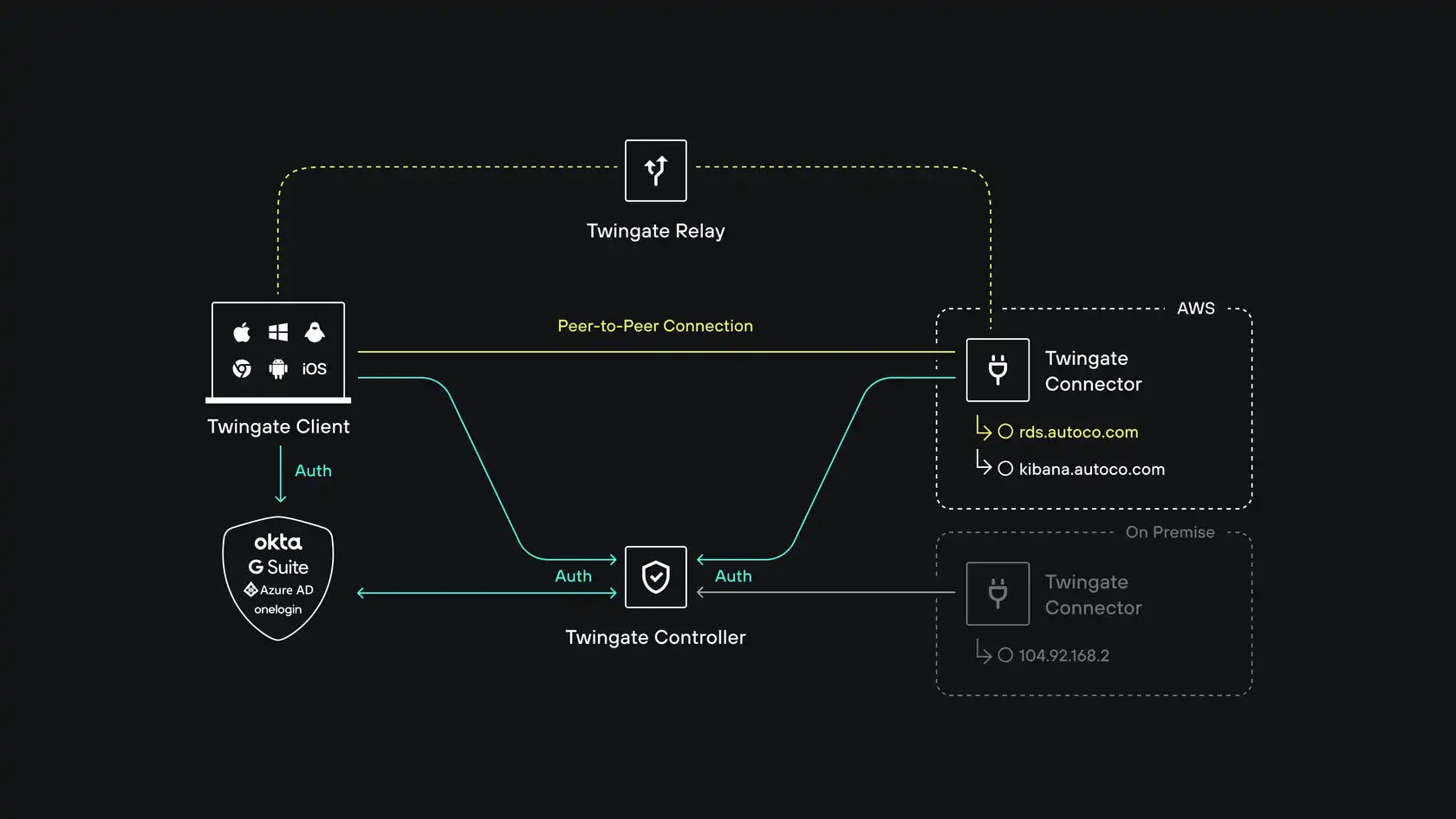
Twingate relies on four components: the Controller, Clients, Connectors and our Relay infrastructure. Together, these components ensure that only authenticated users are able to access the Resources that they have been authorized to access.
Kubernetes configs
Kubeconfigs were a primary target, and for good reason: a valid kubeconfig typically grants direct API access to the cluster. The malware collected configs from ~/.kube/config, admin configurations, and service account tokens.
Twingate Identity Firewall with Privileged Access for Kubernetes routes access to the Kubernetes API server through an application-aware gateway. Users authenticate through your existing identity provider, and that identity propagates through to Kubernetes RBAC, no separate cluster credentials required. Every command is logged and attributed to a specific user with full session replay.
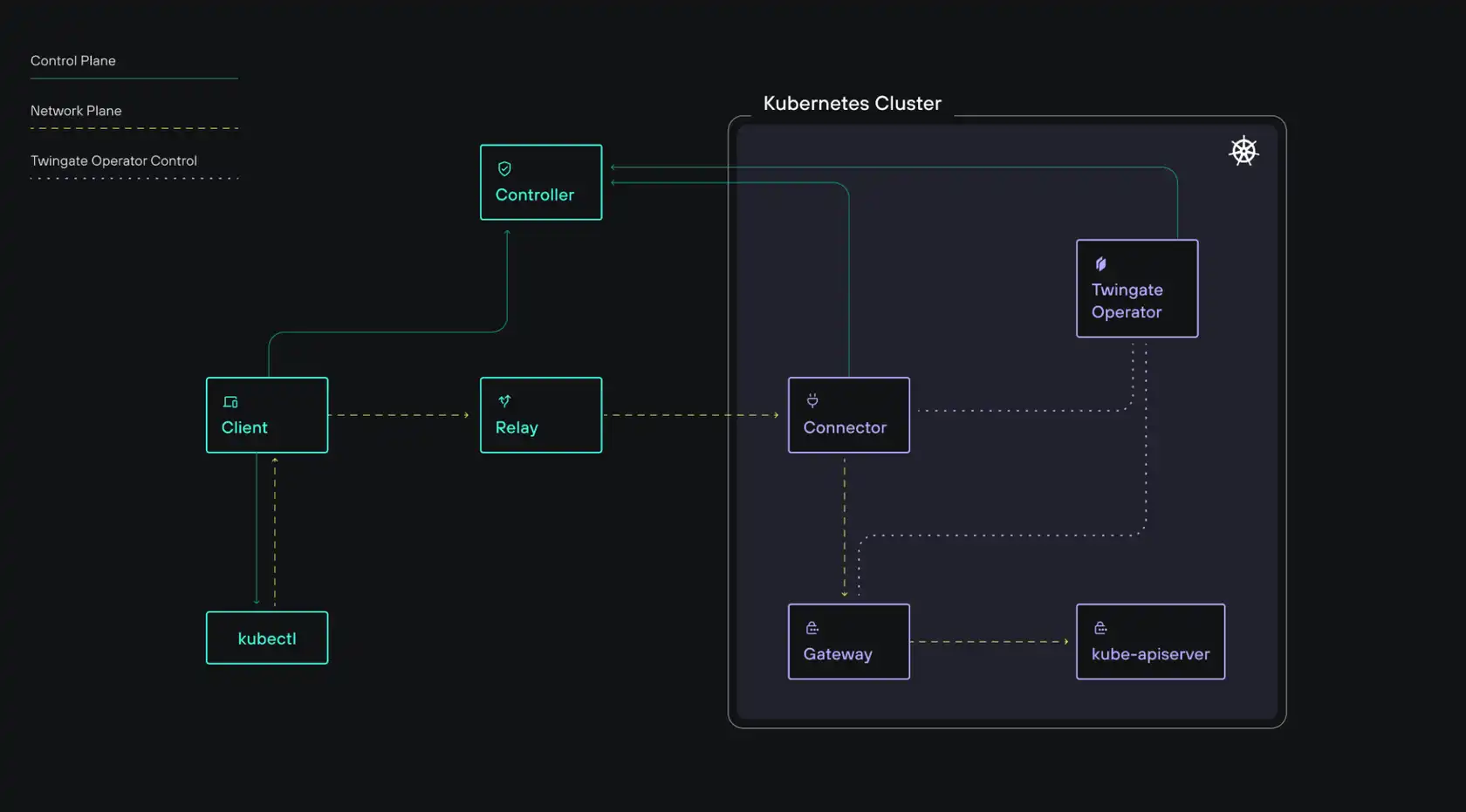
Twingate Privileged Access for Kubernetes introduces a Twingate Gateway, an application-level (Layer 7) reverse proxy deployed within your environment. This Gateway enables identity propagation and session recording for Kubernetes interactions.
Critically, the kubeconfig contexts that Twingate adds to ~/.kube/config contain no credentials at all. They hold only the routing information needed to reach the cluster through Twingate. Malware has nothing to collect.
Authentication happens at access time, through a verified identity on a compliant device, not through a credential file sitting on disk.
Cloud credentials
The malware collected AWS credentials, GCP application default credentials, and Azure tokens. Cloud console access is typically the most dangerous category — it can reach production data, allow infrastructure modification, and enable lateral movement across an organization.
When cloud console and API access runs through Twingate with device posture enforcement, valid credentials alone aren't enough. The request also needs to come from a managed, compliant endpoint: enrolled in MDM, running your EDR agent (CrowdStrike, SentinelOne, and others are supported), with disk encryption enabled and the OS patched. An attacker's machine won't satisfy those requirements regardless of the credentials it holds.
Environment variable tokens
Environment variables are a common place for secrets to accumulate, and the malware grabbed all of them via printenv — typically yielding API tokens for SaaS services, internal tools, and third-party integrations.
For any application whose access is gated through Twingate, whether through direct resource protection or SSO-linked access policies, a stolen token still needs to arrive from a device and identity that passes your access policies. The token alone isn't sufficient.
The exfiltration attempt
The LiteLLM malware sent stolen data to models.litellm.cloud, a domain crafted to look legitimate. Twingate's DNS Filtering is directly relevant here: it blocks connections to known malicious domains and logs anomalous outbound DNS queries from managed devices. Because it operates at the network level across all applications, not just browsers, it covers exactly this scenario: a Python subprocess making a connection to an attacker-controlled endpoint.
Newly registered domains can be proactively blocked in Twingate’s secure DNS settings and DNS logging provides security teams with visibility into unusual traffic, enabling investigation of suspicious connections before credentials or other sensitive data are exploited.
Revoke access on session end. Standing privileges, where credentials or sessions remain valid indefinitely, are the reason credential theft has such long shelf life. Access that expires when a session ends, or that requires periodic re-authentication, limits how long a stolen credential remains useful.
What the LiteLLM Attack Should Prompt You to Review
If you're running AI infrastructure that uses LiteLLM or similar packages, a few immediate questions are worth asking:
Do your CI/CD environments have access to production credentials they don't strictly need?
Are your API keys and cloud credentials scoped to the minimum required permissions?
How quickly can you detect and revoke a compromised credential?
Are you running Agent AI’s securely, in segmented separate networks with least privilege access?
Are your internal services reachable from outside your private network?
The last question matters more than it might seem. Supply chain compromises frequently become lateral movement opportunities. If an attacker can use stolen credentials to reach internal infrastructure, they've moved from a compromised developer machine into your private network. If your internal resources aren't accessible from the internet in the first place, that path is closed.
Configuring Secure Package Managers
As supply chain attacks continue to escalate, a simple but effective mitigation is to enforce a recently released age limit in your package manager by only allowing dependencies that have been published for at least a set period, commonly 7 - 14 days.
This delay significantly reduces exposure to freshly compromised packages, which are often detected and removed shortly after release, as seen in incidents like the LiteLLM compromise and similar software supply chain attacks.
By trading a small amount of update latency for a much stronger security posture, developers can avoid pulling in zero-day malicious versions during routine installs while still receiving stable, vetted releases shortly afterward.
For npm, this can now be configured natively (npm ≥ 11.10) by setting a global npm config set min-release-age 14 or project-level rule such as min-release-age=7 in your .npmrc, which automatically blocks package versions newer than 7 days during npm install.
For Python (PyPi), the standard pip tool does not yet support a rolling minimum-age policy, but the modern drop-in replacement uv can be installed with pip install -U uv that provides this capability via a simple persistent config like exclude-newer = "7 days" in pyproject.toml, ensuring only sufficiently aged releases are installed.
These configurations help reduce the risk of supply chain compromise by ensuring that only packages that have aged beyond the initial high-risk window are eligible for installation.
This Pattern Isn't Slowing Down
Supply chain attacks targeting AI and developer tooling are increasing in frequency. The LiteLLM attack followed the same pattern as the Trivy attack attributed to the same group. The attack surface expands every time you add a dependency, and packages with millions of daily downloads are high-value targets.
You can audit, pin, and scan, and you should. But also design your access model around the assumption that a compromise will happen, and plan for what an attacker can actually do after they have credentials.
Least-privilege access, identity-aware access policies, outbound-only architecture, and audit visibility don't prevent supply chain attacks. They control what the attacker gets when one succeeds.
The credentials were already gone. Whether they're worth anything is still up to you.
For more on how Twingate enforces least-privilege access and removes exposed infrastructure from your attack surface, the Twingate documentation covers Connector setup, access policy configuration, and integrations with major identity providers including Okta, Azure AD, and Google Workspace.
New to Twingate? You can use Twingate for free for up to 5 users, request a personalized demo, or reach out to the team over on the Twingate subreddit.
Rapidly implement a modern Zero Trust network that is more secure and maintainable than VPNs.
Stolen Keys, Locked Doors: What the LiteLLM Supply Chain Attack Reveals About Access Security
A supply chain attack on LiteLLM on March 24, 2026, put cloud credentials and API keys at risk across millions of developer environments.
The credentials were already gone before most people knew anything happened. The real question was whether they'd be worth anything to whoever had them.
That framing matters because the natural response to a supply chain compromise is to focus on prevention: better dependency auditing, pinned versions, software composition analysis tools. Those things are worth doing. But the LiteLLM attack is a useful case for thinking about what happens after a credential theft, and what your access model needs to look like to reduce the damage.
What Happened
LiteLLM is an open-source Python package that acts as a unified interface for AI systems, letting developers call various large language model APIs through a single library. Wiz Research estimates it's present in roughly 36% of cloud environments, with approximately 3 million daily downloads.
On March 24, attackers connected to a group called TeamPCP published versions 1.82.7 and 1.82.8 to PyPI. Both versions contained malicious code capable of:
Extracting cloud credentials, API keys, and cryptocurrency wallets
Installing persistent downloaders for deeper system access
Establishing a connection to a command-and-control (C2) server
The malware contacted its C2 server every 50 minutes, a cadence likely chosen to avoid triggering automated sandbox detection. Responses from the C2 sometimes contained YouTube song links, suggesting the attackers were delivering payloads selectively rather than indiscriminately.
The packages were removed from PyPI within at least two hours. No widespread exploitation has been publicly confirmed, but anyone who ran pip install litellm during that window with environment credentials accessible may have been affected.
TeamPCP has previously claimed responsibility for a similar attack on Aqua Security's Trivy vulnerability scanner. This is an organized group, actively targeting developer and security tooling.
Why LiteLLM Was a High-Value Target
This wasn't a random package compromise. LiteLLM sits in an unusually sensitive position in the modern AI stack: it acts as a universal proxy between applications and AI model providers, which means a single machine running LiteLLM often has API keys for multiple AI providers, cloud credentials for the infrastructure it's deployed on, and access to internal services it routes requests to.
Compromise one LiteLLM host and the malware potentially collects keys across an entire AI infrastructure in a single pass. That concentration of credentials in one place is exactly what makes a package like this worth targeting.
Why This Attack Pattern Is Hard to Stop at the Perimeter
The typical response to a supply chain attack is to audit your dependencies, pin your versions, and add a software composition analysis (SCA) tool to your CI pipeline. All of that is worth doing. None of it would have stopped this specific attack.
Version pinning doesn't help when a new patch version of a package you're already tracking gets poisoned. SCA tools catch known vulnerabilities, but they don't catch zero-day malicious code that hasn't been analyzed yet. The malicious versions were published under the legitimate package's namespace, by an account with valid publishing credentials. From PyPI's perspective, nothing was wrong.
This is the core problem with supply chain attacks on high-trust packages: the attacker inherits the trust you've already extended to the package. By the time you know something is wrong, the malicious code may have already run.
Perimeter security doesn't help either. A developer running pip install inside a corporate network, or inside a cloud build environment, is doing something that looks entirely normal. There's no network anomaly to detect. The attack succeeds precisely because it looks like legitimate software installation.
What Attackers Actually Want
This wasn't a case of malware trying to disrupt operations. Rather, it was going after credentials: cloud credentials, API keys, and wallet information. That's worth understanding in terms of what it tells us about attacker behavior after a successful supply chain compromise.
Stolen cloud credentials don't just expose one resource. In many environments, a single set of AWS or GCP credentials can grant access to storage buckets, databases, internal services, and build pipelines. If those credentials are long-lived and broadly scoped, a brief window of access is enough to cause serious downstream damage.
API keys are often worse. Developers frequently create them with broad permissions and leave them in environment variables, CI systems, or configuration files. Once an attacker has a key with sufficient scope, they can authenticate to external services as your workload, exfiltrate data, or move laterally across connected systems.
The attackers took a low and slow approach, with 50-minute C2 check-in intervals and the selective payload delivery. They weren't looking for mass disruption. They were collecting credentials for future use, against high-value targets they'd identify later.
The Question Your Access Model Needs to Answer
When credentials get stolen via a supply chain attack, it's important to move beyond the question "how do we prevent the compromise?" Instead, ask "what can an attacker actually do with what they took?”
That question is answered entirely by how your access model is designed.
If a developer's environment credentials grant broad access to your internal network, every service, and every environment they work in, a credential theft is catastrophic. The attacker doesn't need to escalate privileges. They just use what they have.
If those same credentials are tightly scoped, and if access to internal resources requires a verified identity through your identity provider rather than just possession of a token, the blast radius of a supply chain compromise shrinks significantly.
Least-Privilege Access as a Practical Defense
Stolen credentials are only useful if they can reach something. That's the architectural insight behind Zero Trust Network Access: not that it prevents the initial compromise, but that it determines what an attacker can actually do with what they took.
Scope credentials to what's necessary. Cloud credentials used in development environments shouldn't have production access. API keys should be scoped to the minimum permissions required for the task. This sounds obvious and is frequently ignored.
The rest comes down to how you've built your access layer. Here's what that looks like for the specific credential types the LiteLLM malware targeted.
SSH keys
The malware swept every SSH private key it could find: RSA, Ed25519, ECDSA. In a traditional environment, those keys are often all an attacker needs: point them at a server's public IP and the door opens.
Twingate’s architecture removes the public IP from the equation. Internal servers are accessible only through outbound-only Connectors with no inbound attack surface. An attacker holding valid keys has no surface to connect them to.
Twingate relies on four components: the Controller, Clients, Connectors and our Relay infrastructure. Together, these components ensure that only authenticated users are able to access the Resources that they have been authorized to access.
Kubernetes configs
Kubeconfigs were a primary target, and for good reason: a valid kubeconfig typically grants direct API access to the cluster. The malware collected configs from ~/.kube/config, admin configurations, and service account tokens.
Twingate Identity Firewall with Privileged Access for Kubernetes routes access to the Kubernetes API server through an application-aware gateway. Users authenticate through your existing identity provider, and that identity propagates through to Kubernetes RBAC, no separate cluster credentials required. Every command is logged and attributed to a specific user with full session replay.
Twingate Privileged Access for Kubernetes introduces a Twingate Gateway, an application-level (Layer 7) reverse proxy deployed within your environment. This Gateway enables identity propagation and session recording for Kubernetes interactions.
Critically, the kubeconfig contexts that Twingate adds to ~/.kube/config contain no credentials at all. They hold only the routing information needed to reach the cluster through Twingate. Malware has nothing to collect.
Authentication happens at access time, through a verified identity on a compliant device, not through a credential file sitting on disk.
Cloud credentials
The malware collected AWS credentials, GCP application default credentials, and Azure tokens. Cloud console access is typically the most dangerous category — it can reach production data, allow infrastructure modification, and enable lateral movement across an organization.
When cloud console and API access runs through Twingate with device posture enforcement, valid credentials alone aren't enough. The request also needs to come from a managed, compliant endpoint: enrolled in MDM, running your EDR agent (CrowdStrike, SentinelOne, and others are supported), with disk encryption enabled and the OS patched. An attacker's machine won't satisfy those requirements regardless of the credentials it holds.
Environment variable tokens
Environment variables are a common place for secrets to accumulate, and the malware grabbed all of them via printenv — typically yielding API tokens for SaaS services, internal tools, and third-party integrations.
For any application whose access is gated through Twingate, whether through direct resource protection or SSO-linked access policies, a stolen token still needs to arrive from a device and identity that passes your access policies. The token alone isn't sufficient.
The exfiltration attempt
The LiteLLM malware sent stolen data to models.litellm.cloud, a domain crafted to look legitimate. Twingate's DNS Filtering is directly relevant here: it blocks connections to known malicious domains and logs anomalous outbound DNS queries from managed devices. Because it operates at the network level across all applications, not just browsers, it covers exactly this scenario: a Python subprocess making a connection to an attacker-controlled endpoint.
Newly registered domains can be proactively blocked in Twingate’s secure DNS settings and DNS logging provides security teams with visibility into unusual traffic, enabling investigation of suspicious connections before credentials or other sensitive data are exploited.
Revoke access on session end. Standing privileges, where credentials or sessions remain valid indefinitely, are the reason credential theft has such long shelf life. Access that expires when a session ends, or that requires periodic re-authentication, limits how long a stolen credential remains useful.
What the LiteLLM Attack Should Prompt You to Review
If you're running AI infrastructure that uses LiteLLM or similar packages, a few immediate questions are worth asking:
Do your CI/CD environments have access to production credentials they don't strictly need?
Are your API keys and cloud credentials scoped to the minimum required permissions?
How quickly can you detect and revoke a compromised credential?
Are you running Agent AI’s securely, in segmented separate networks with least privilege access?
Are your internal services reachable from outside your private network?
The last question matters more than it might seem. Supply chain compromises frequently become lateral movement opportunities. If an attacker can use stolen credentials to reach internal infrastructure, they've moved from a compromised developer machine into your private network. If your internal resources aren't accessible from the internet in the first place, that path is closed.
Configuring Secure Package Managers
As supply chain attacks continue to escalate, a simple but effective mitigation is to enforce a recently released age limit in your package manager by only allowing dependencies that have been published for at least a set period, commonly 7 - 14 days.
This delay significantly reduces exposure to freshly compromised packages, which are often detected and removed shortly after release, as seen in incidents like the LiteLLM compromise and similar software supply chain attacks.
By trading a small amount of update latency for a much stronger security posture, developers can avoid pulling in zero-day malicious versions during routine installs while still receiving stable, vetted releases shortly afterward.
For npm, this can now be configured natively (npm ≥ 11.10) by setting a global npm config set min-release-age 14 or project-level rule such as min-release-age=7 in your .npmrc, which automatically blocks package versions newer than 7 days during npm install.
For Python (PyPi), the standard pip tool does not yet support a rolling minimum-age policy, but the modern drop-in replacement uv can be installed with pip install -U uv that provides this capability via a simple persistent config like exclude-newer = "7 days" in pyproject.toml, ensuring only sufficiently aged releases are installed.
These configurations help reduce the risk of supply chain compromise by ensuring that only packages that have aged beyond the initial high-risk window are eligible for installation.
This Pattern Isn't Slowing Down
Supply chain attacks targeting AI and developer tooling are increasing in frequency. The LiteLLM attack followed the same pattern as the Trivy attack attributed to the same group. The attack surface expands every time you add a dependency, and packages with millions of daily downloads are high-value targets.
You can audit, pin, and scan, and you should. But also design your access model around the assumption that a compromise will happen, and plan for what an attacker can actually do after they have credentials.
Least-privilege access, identity-aware access policies, outbound-only architecture, and audit visibility don't prevent supply chain attacks. They control what the attacker gets when one succeeds.
The credentials were already gone. Whether they're worth anything is still up to you.
For more on how Twingate enforces least-privilege access and removes exposed infrastructure from your attack surface, the Twingate documentation covers Connector setup, access policy configuration, and integrations with major identity providers including Okta, Azure AD, and Google Workspace.
New to Twingate? You can use Twingate for free for up to 5 users, request a personalized demo, or reach out to the team over on the Twingate subreddit.
Rapidly implement a modern Zero Trust network that is more secure and maintainable than VPNs.
Stolen Keys, Locked Doors: What the LiteLLM Supply Chain Attack Reveals About Access Security
A supply chain attack on LiteLLM on March 24, 2026, put cloud credentials and API keys at risk across millions of developer environments.
The credentials were already gone before most people knew anything happened. The real question was whether they'd be worth anything to whoever had them.
That framing matters because the natural response to a supply chain compromise is to focus on prevention: better dependency auditing, pinned versions, software composition analysis tools. Those things are worth doing. But the LiteLLM attack is a useful case for thinking about what happens after a credential theft, and what your access model needs to look like to reduce the damage.
What Happened
LiteLLM is an open-source Python package that acts as a unified interface for AI systems, letting developers call various large language model APIs through a single library. Wiz Research estimates it's present in roughly 36% of cloud environments, with approximately 3 million daily downloads.
On March 24, attackers connected to a group called TeamPCP published versions 1.82.7 and 1.82.8 to PyPI. Both versions contained malicious code capable of:
Extracting cloud credentials, API keys, and cryptocurrency wallets
Installing persistent downloaders for deeper system access
Establishing a connection to a command-and-control (C2) server
The malware contacted its C2 server every 50 minutes, a cadence likely chosen to avoid triggering automated sandbox detection. Responses from the C2 sometimes contained YouTube song links, suggesting the attackers were delivering payloads selectively rather than indiscriminately.
The packages were removed from PyPI within at least two hours. No widespread exploitation has been publicly confirmed, but anyone who ran pip install litellm during that window with environment credentials accessible may have been affected.
TeamPCP has previously claimed responsibility for a similar attack on Aqua Security's Trivy vulnerability scanner. This is an organized group, actively targeting developer and security tooling.
Why LiteLLM Was a High-Value Target
This wasn't a random package compromise. LiteLLM sits in an unusually sensitive position in the modern AI stack: it acts as a universal proxy between applications and AI model providers, which means a single machine running LiteLLM often has API keys for multiple AI providers, cloud credentials for the infrastructure it's deployed on, and access to internal services it routes requests to.
Compromise one LiteLLM host and the malware potentially collects keys across an entire AI infrastructure in a single pass. That concentration of credentials in one place is exactly what makes a package like this worth targeting.
Why This Attack Pattern Is Hard to Stop at the Perimeter
The typical response to a supply chain attack is to audit your dependencies, pin your versions, and add a software composition analysis (SCA) tool to your CI pipeline. All of that is worth doing. None of it would have stopped this specific attack.
Version pinning doesn't help when a new patch version of a package you're already tracking gets poisoned. SCA tools catch known vulnerabilities, but they don't catch zero-day malicious code that hasn't been analyzed yet. The malicious versions were published under the legitimate package's namespace, by an account with valid publishing credentials. From PyPI's perspective, nothing was wrong.
This is the core problem with supply chain attacks on high-trust packages: the attacker inherits the trust you've already extended to the package. By the time you know something is wrong, the malicious code may have already run.
Perimeter security doesn't help either. A developer running pip install inside a corporate network, or inside a cloud build environment, is doing something that looks entirely normal. There's no network anomaly to detect. The attack succeeds precisely because it looks like legitimate software installation.
What Attackers Actually Want
This wasn't a case of malware trying to disrupt operations. Rather, it was going after credentials: cloud credentials, API keys, and wallet information. That's worth understanding in terms of what it tells us about attacker behavior after a successful supply chain compromise.
Stolen cloud credentials don't just expose one resource. In many environments, a single set of AWS or GCP credentials can grant access to storage buckets, databases, internal services, and build pipelines. If those credentials are long-lived and broadly scoped, a brief window of access is enough to cause serious downstream damage.
API keys are often worse. Developers frequently create them with broad permissions and leave them in environment variables, CI systems, or configuration files. Once an attacker has a key with sufficient scope, they can authenticate to external services as your workload, exfiltrate data, or move laterally across connected systems.
The attackers took a low and slow approach, with 50-minute C2 check-in intervals and the selective payload delivery. They weren't looking for mass disruption. They were collecting credentials for future use, against high-value targets they'd identify later.
The Question Your Access Model Needs to Answer
When credentials get stolen via a supply chain attack, it's important to move beyond the question "how do we prevent the compromise?" Instead, ask "what can an attacker actually do with what they took?”
That question is answered entirely by how your access model is designed.
If a developer's environment credentials grant broad access to your internal network, every service, and every environment they work in, a credential theft is catastrophic. The attacker doesn't need to escalate privileges. They just use what they have.
If those same credentials are tightly scoped, and if access to internal resources requires a verified identity through your identity provider rather than just possession of a token, the blast radius of a supply chain compromise shrinks significantly.
Least-Privilege Access as a Practical Defense
Stolen credentials are only useful if they can reach something. That's the architectural insight behind Zero Trust Network Access: not that it prevents the initial compromise, but that it determines what an attacker can actually do with what they took.
Scope credentials to what's necessary. Cloud credentials used in development environments shouldn't have production access. API keys should be scoped to the minimum permissions required for the task. This sounds obvious and is frequently ignored.
The rest comes down to how you've built your access layer. Here's what that looks like for the specific credential types the LiteLLM malware targeted.
SSH keys
The malware swept every SSH private key it could find: RSA, Ed25519, ECDSA. In a traditional environment, those keys are often all an attacker needs: point them at a server's public IP and the door opens.
Twingate’s architecture removes the public IP from the equation. Internal servers are accessible only through outbound-only Connectors with no inbound attack surface. An attacker holding valid keys has no surface to connect them to.
Twingate relies on four components: the Controller, Clients, Connectors and our Relay infrastructure. Together, these components ensure that only authenticated users are able to access the Resources that they have been authorized to access.
Kubernetes configs
Kubeconfigs were a primary target, and for good reason: a valid kubeconfig typically grants direct API access to the cluster. The malware collected configs from ~/.kube/config, admin configurations, and service account tokens.
Twingate Identity Firewall with Privileged Access for Kubernetes routes access to the Kubernetes API server through an application-aware gateway. Users authenticate through your existing identity provider, and that identity propagates through to Kubernetes RBAC, no separate cluster credentials required. Every command is logged and attributed to a specific user with full session replay.
Twingate Privileged Access for Kubernetes introduces a Twingate Gateway, an application-level (Layer 7) reverse proxy deployed within your environment. This Gateway enables identity propagation and session recording for Kubernetes interactions.
Critically, the kubeconfig contexts that Twingate adds to ~/.kube/config contain no credentials at all. They hold only the routing information needed to reach the cluster through Twingate. Malware has nothing to collect.
Authentication happens at access time, through a verified identity on a compliant device, not through a credential file sitting on disk.
Cloud credentials
The malware collected AWS credentials, GCP application default credentials, and Azure tokens. Cloud console access is typically the most dangerous category — it can reach production data, allow infrastructure modification, and enable lateral movement across an organization.
When cloud console and API access runs through Twingate with device posture enforcement, valid credentials alone aren't enough. The request also needs to come from a managed, compliant endpoint: enrolled in MDM, running your EDR agent (CrowdStrike, SentinelOne, and others are supported), with disk encryption enabled and the OS patched. An attacker's machine won't satisfy those requirements regardless of the credentials it holds.
Environment variable tokens
Environment variables are a common place for secrets to accumulate, and the malware grabbed all of them via printenv — typically yielding API tokens for SaaS services, internal tools, and third-party integrations.
For any application whose access is gated through Twingate, whether through direct resource protection or SSO-linked access policies, a stolen token still needs to arrive from a device and identity that passes your access policies. The token alone isn't sufficient.
The exfiltration attempt
The LiteLLM malware sent stolen data to models.litellm.cloud, a domain crafted to look legitimate. Twingate's DNS Filtering is directly relevant here: it blocks connections to known malicious domains and logs anomalous outbound DNS queries from managed devices. Because it operates at the network level across all applications, not just browsers, it covers exactly this scenario: a Python subprocess making a connection to an attacker-controlled endpoint.
Newly registered domains can be proactively blocked in Twingate’s secure DNS settings and DNS logging provides security teams with visibility into unusual traffic, enabling investigation of suspicious connections before credentials or other sensitive data are exploited.
Revoke access on session end. Standing privileges, where credentials or sessions remain valid indefinitely, are the reason credential theft has such long shelf life. Access that expires when a session ends, or that requires periodic re-authentication, limits how long a stolen credential remains useful.
What the LiteLLM Attack Should Prompt You to Review
If you're running AI infrastructure that uses LiteLLM or similar packages, a few immediate questions are worth asking:
Do your CI/CD environments have access to production credentials they don't strictly need?
Are your API keys and cloud credentials scoped to the minimum required permissions?
How quickly can you detect and revoke a compromised credential?
Are you running Agent AI’s securely, in segmented separate networks with least privilege access?
Are your internal services reachable from outside your private network?
The last question matters more than it might seem. Supply chain compromises frequently become lateral movement opportunities. If an attacker can use stolen credentials to reach internal infrastructure, they've moved from a compromised developer machine into your private network. If your internal resources aren't accessible from the internet in the first place, that path is closed.
Configuring Secure Package Managers
As supply chain attacks continue to escalate, a simple but effective mitigation is to enforce a recently released age limit in your package manager by only allowing dependencies that have been published for at least a set period, commonly 7 - 14 days.
This delay significantly reduces exposure to freshly compromised packages, which are often detected and removed shortly after release, as seen in incidents like the LiteLLM compromise and similar software supply chain attacks.
By trading a small amount of update latency for a much stronger security posture, developers can avoid pulling in zero-day malicious versions during routine installs while still receiving stable, vetted releases shortly afterward.
For npm, this can now be configured natively (npm ≥ 11.10) by setting a global npm config set min-release-age 14 or project-level rule such as min-release-age=7 in your .npmrc, which automatically blocks package versions newer than 7 days during npm install.
For Python (PyPi), the standard pip tool does not yet support a rolling minimum-age policy, but the modern drop-in replacement uv can be installed with pip install -U uv that provides this capability via a simple persistent config like exclude-newer = "7 days" in pyproject.toml, ensuring only sufficiently aged releases are installed.
These configurations help reduce the risk of supply chain compromise by ensuring that only packages that have aged beyond the initial high-risk window are eligible for installation.
This Pattern Isn't Slowing Down
Supply chain attacks targeting AI and developer tooling are increasing in frequency. The LiteLLM attack followed the same pattern as the Trivy attack attributed to the same group. The attack surface expands every time you add a dependency, and packages with millions of daily downloads are high-value targets.
You can audit, pin, and scan, and you should. But also design your access model around the assumption that a compromise will happen, and plan for what an attacker can actually do after they have credentials.
Least-privilege access, identity-aware access policies, outbound-only architecture, and audit visibility don't prevent supply chain attacks. They control what the attacker gets when one succeeds.
The credentials were already gone. Whether they're worth anything is still up to you.
For more on how Twingate enforces least-privilege access and removes exposed infrastructure from your attack surface, the Twingate documentation covers Connector setup, access policy configuration, and integrations with major identity providers including Okta, Azure AD, and Google Workspace.
New to Twingate? You can use Twingate for free for up to 5 users, request a personalized demo, or reach out to the team over on the Twingate subreddit.
Solutions
Solutions
The VPN replacement your workforce will love.
Solutions